ADLER
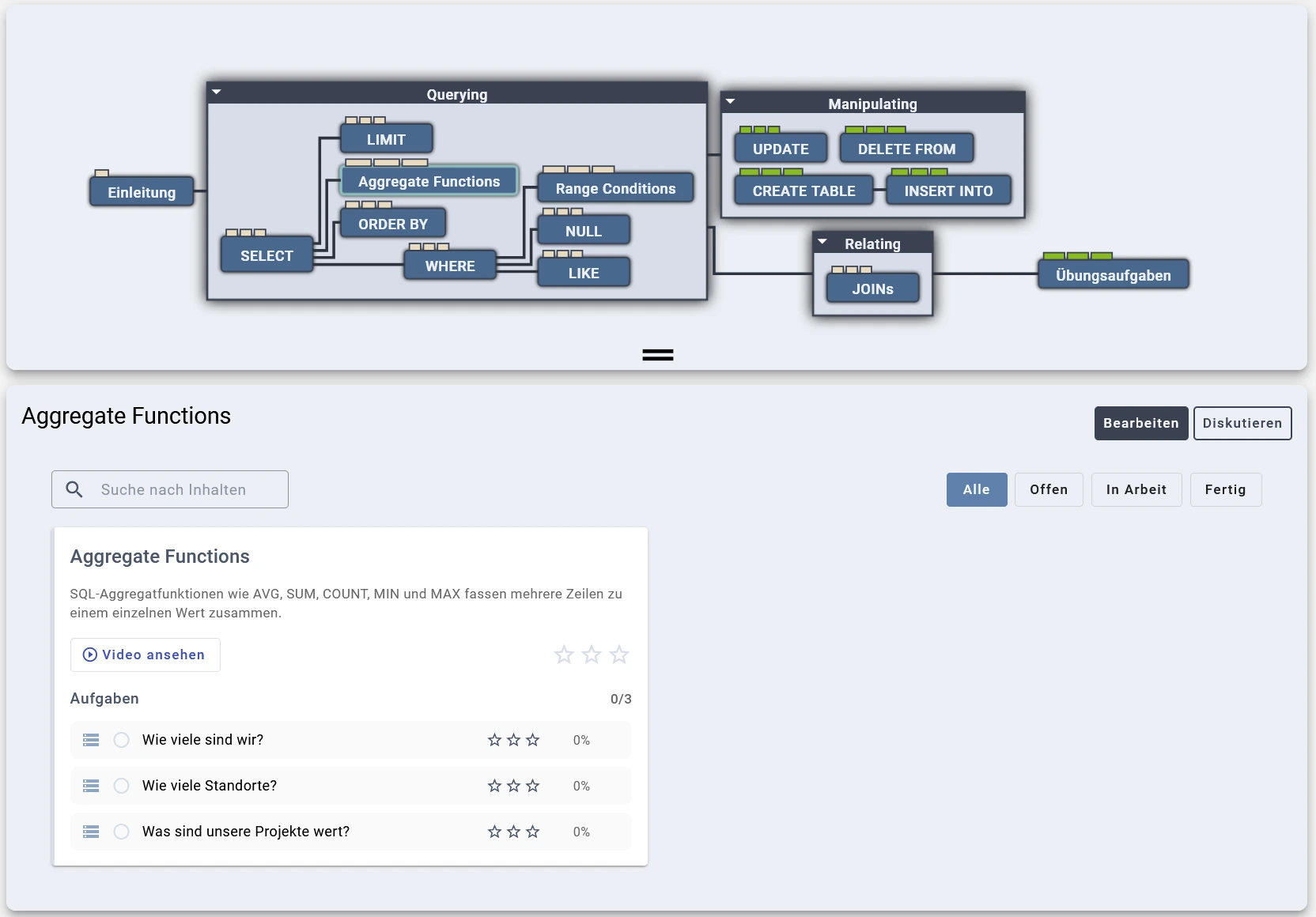
ADLER extends the GOALS practice platform with SQL tasks for the Database Systems lecture. The SQL concept graph is based on Harvard's CS50 SQL course (CC BY-NC-SA 4.0) and covers three main areas: Querying (SELECT, WHERE, ORDER BY, Aggregate Functions, LIMIT, LIKE, NULL, Range Conditions), Manipulating (INSERT INTO, UPDATE, DELETE FROM, CREATE TABLE), Relating (JOINs) and more within them. As with all concept graphs in GOALS, students navigate their learning path based on the visualized dependencies between SQL concepts.
SQL Tasks
Intro Video for Students
Execution Environment
Each query runs inside a pre-warmed Docker container, ensuring fast response times and full isolation (using gVisor). This architecture also supports Data Manipulation Language (DML) statements (CREATE, INSERT, UPDATE, DELETE), since students can freely modify the database within their container without affecting other users.
SQL Editor
Students write SQL queries in the Monaco Editor with syntax highlighting. The editor also supports context-aware autocompletion based on the database schema of the current task (table names, column names, etc.). However, autocompletion is disabled by default so that students practice looking up the schema themselves, as they would in an exam.
Schema View
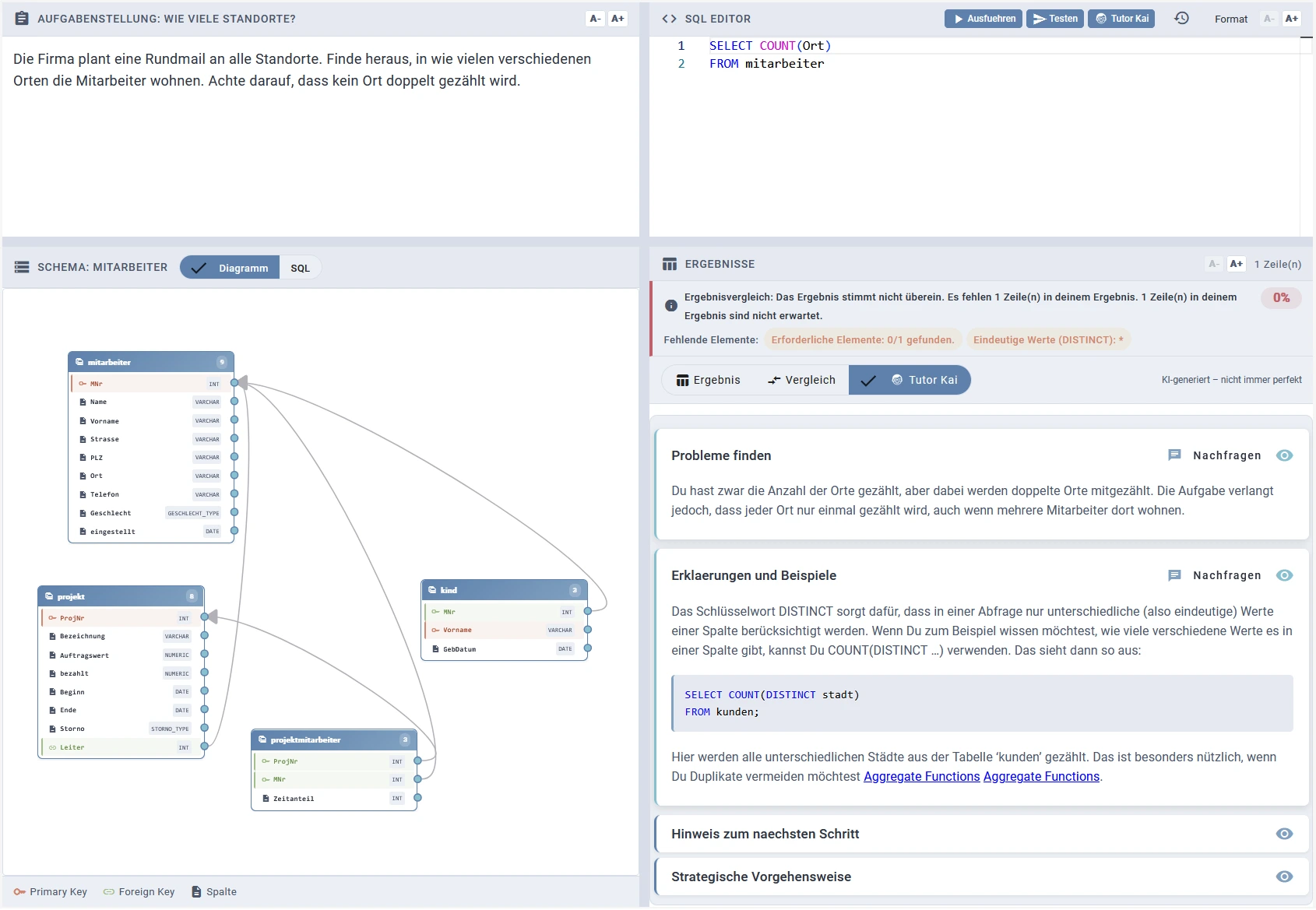
Students can view the database schema either as the corresponding CREATE TABLE statements (SQL tab) or as an interactive diagram that shows tables, columns, data types, primary keys, and foreign key relationships (Diagram tab).
Automated Assessment
Result Table Comparison
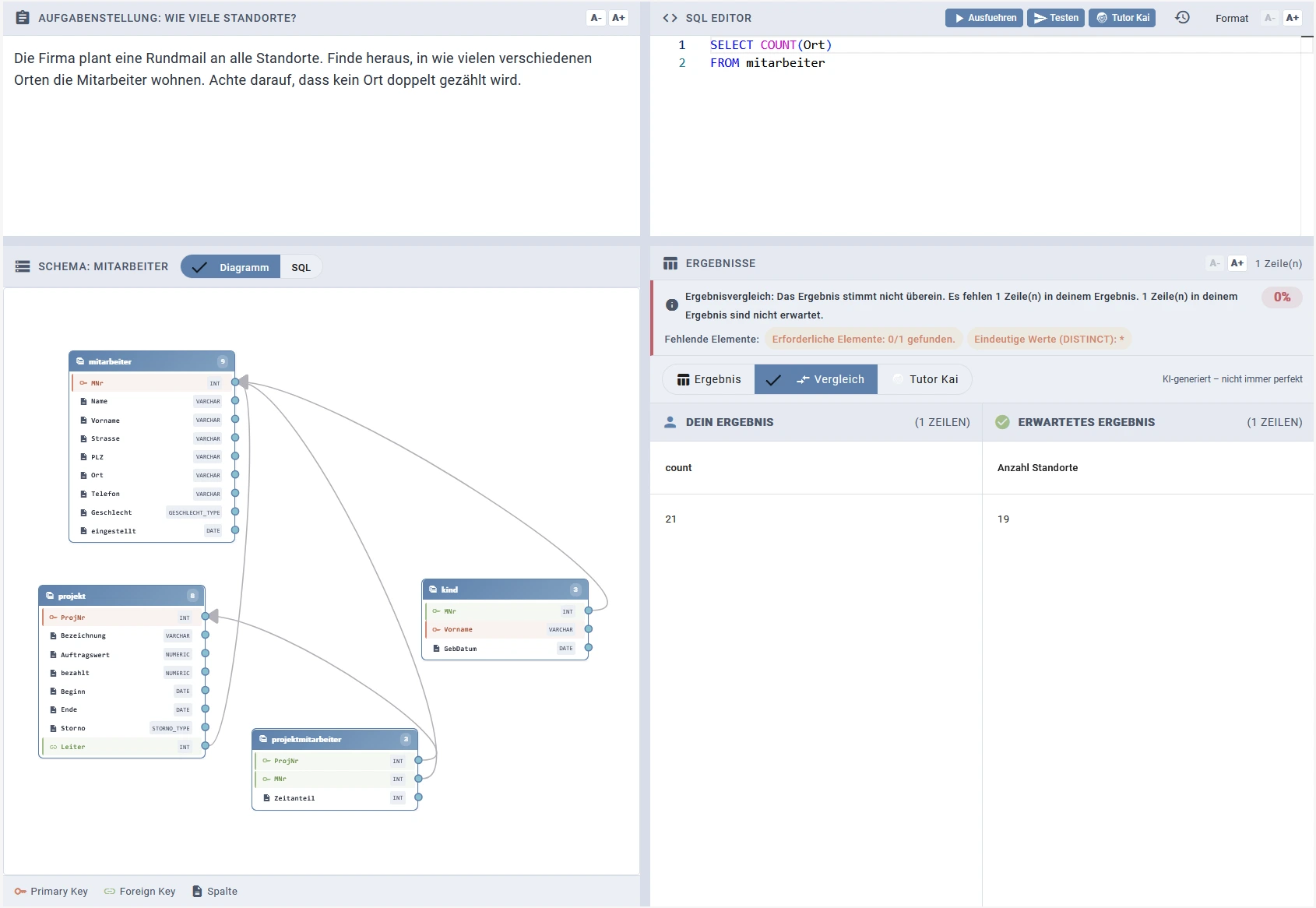
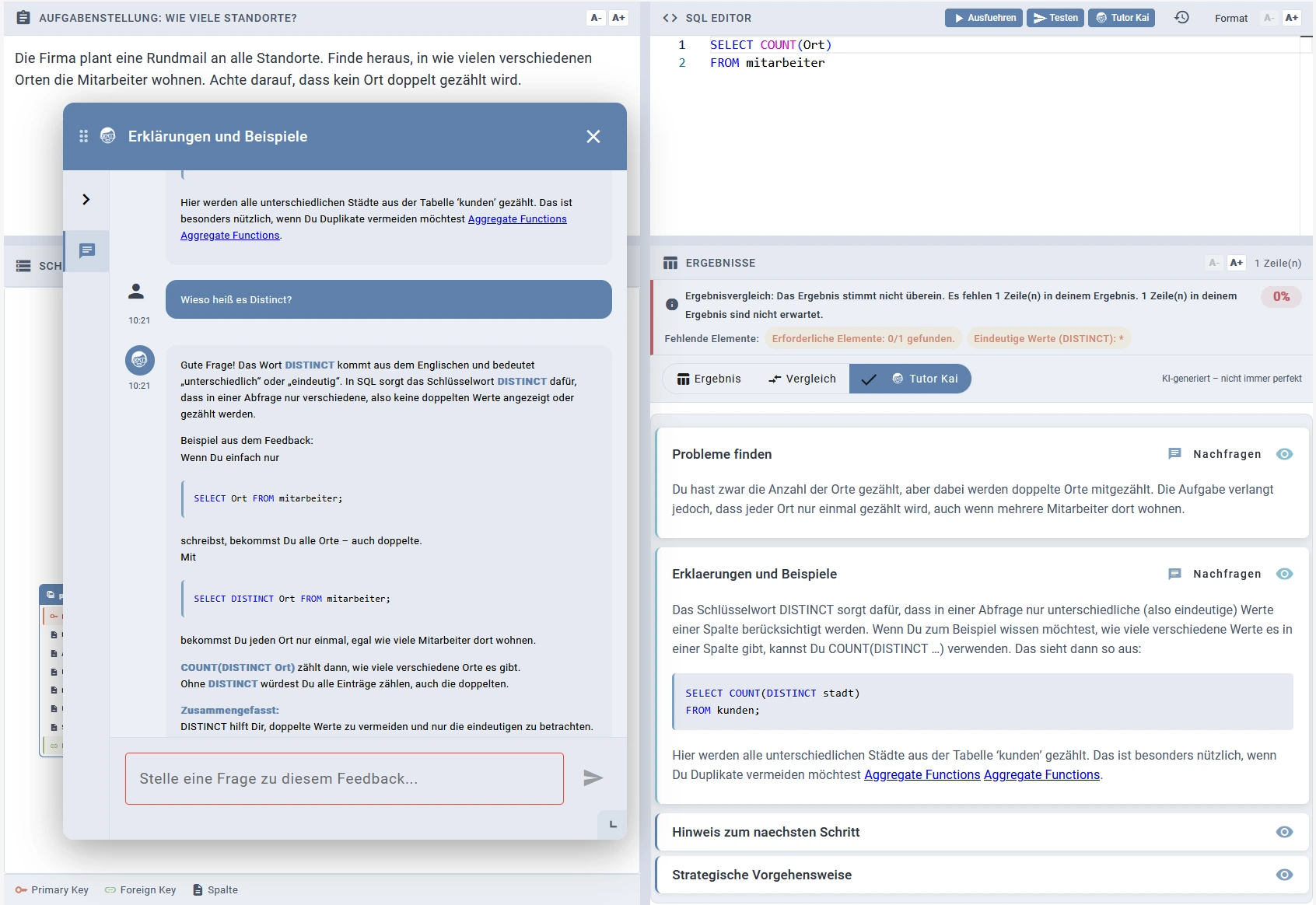
For each task, educators provide a reference solution. When students submit their query, the system compares the resulting table against the reference solution. By default, the comparison ignores the order of both columns and rows. For ORDER BY tasks, educators can configure the system to enforce row order. After submission, students see both their own result and the expected result side by side in a comparison view.
SQL Concept Verification
The reference solution is analyzed with Tree-sitter to identify the SQL concepts it contains. Educators can then select which of these concepts must appear in the student's query, for example when the task description explicitly requires a specific SQL construct. After submission, missing required concepts are highlighted to the student (e.g., "Required elements: 0/1 found", "DISTINCT").
DML Task Assessment
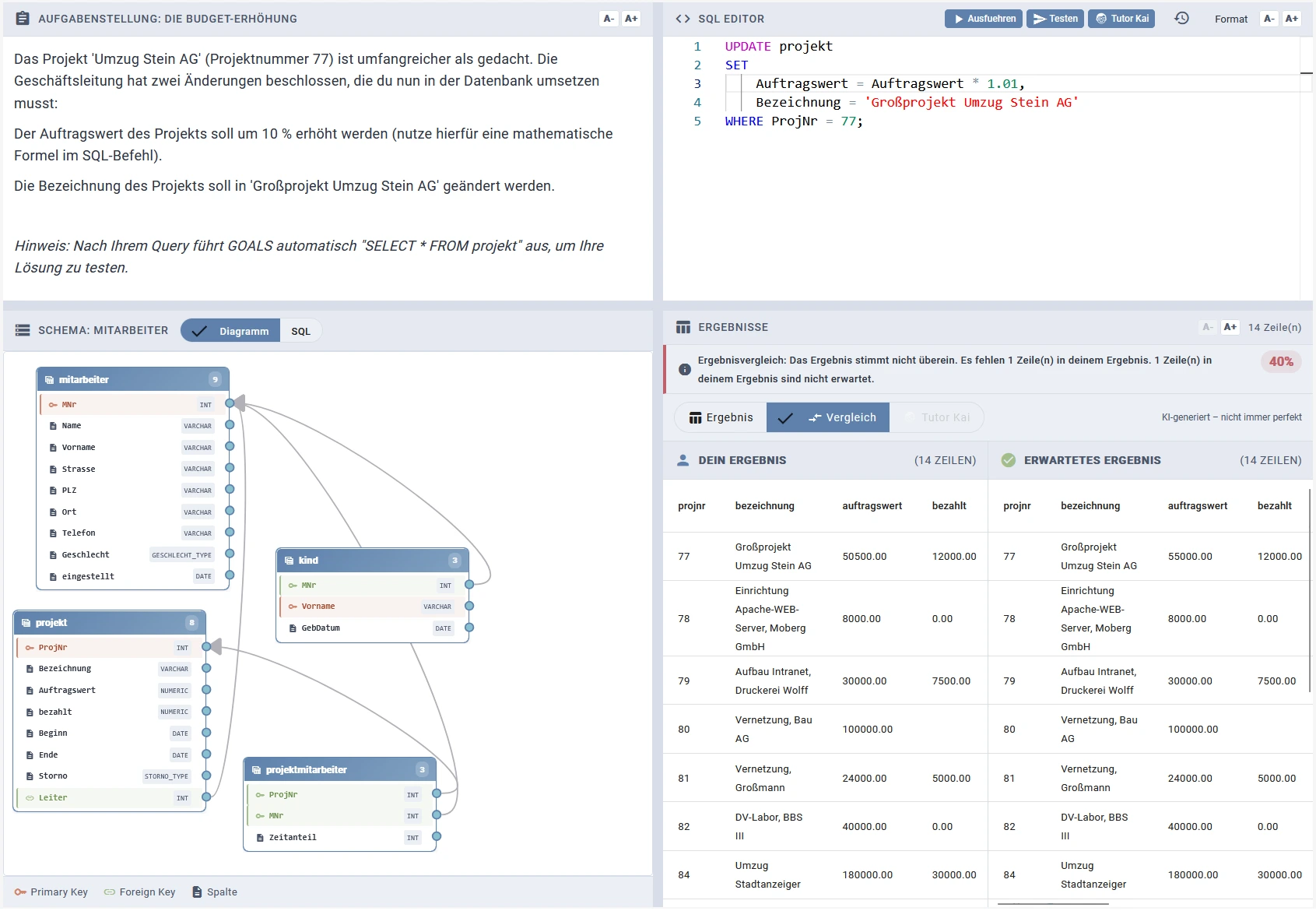
For DML tasks, educators additionally provide a SELECT statement that runs after the student's query. This verification query checks whether the database was modified as expected. The result is then compared against the expected outcome using the same table comparison.
Tutor-Kai Feedback
SQL tasks are fully integrated with Tutor-Kai. Students receive the four established feedback components:
- Find Problems (Probleme finden): Describes the student's mistakes in the SQL query, referencing the task requirements.
- Explanations and Examples (Erklärungen und Beispiele): Explains relevant SQL concepts with generic code examples and links to lecture video recordings via the RAG pipeline.
- Next Step Hint (Hinweis zum nächsten Schritt): Provides an actionable next step toward correcting the mistake without giving the solution.
- Strategic Approach (Strategische Vorgehensweise): Outlines a general, step-by-step strategy for solving similar SQL tasks.
Students can ask follow-up questions about any individual feedback component, opening a context-aware chat for deeper exploration of the topic.
Relational Algebra Tasks
Complementing the SQL tasks, ADLER also covers the theoretical foundation of query languages: relational algebra. Students formulate expressions using the standard operators — projection (π), selection (σ), join (⋈), cross product (×), union (∪), difference (−), intersection (∩), rename (ρ), and division (÷).
RA Editor
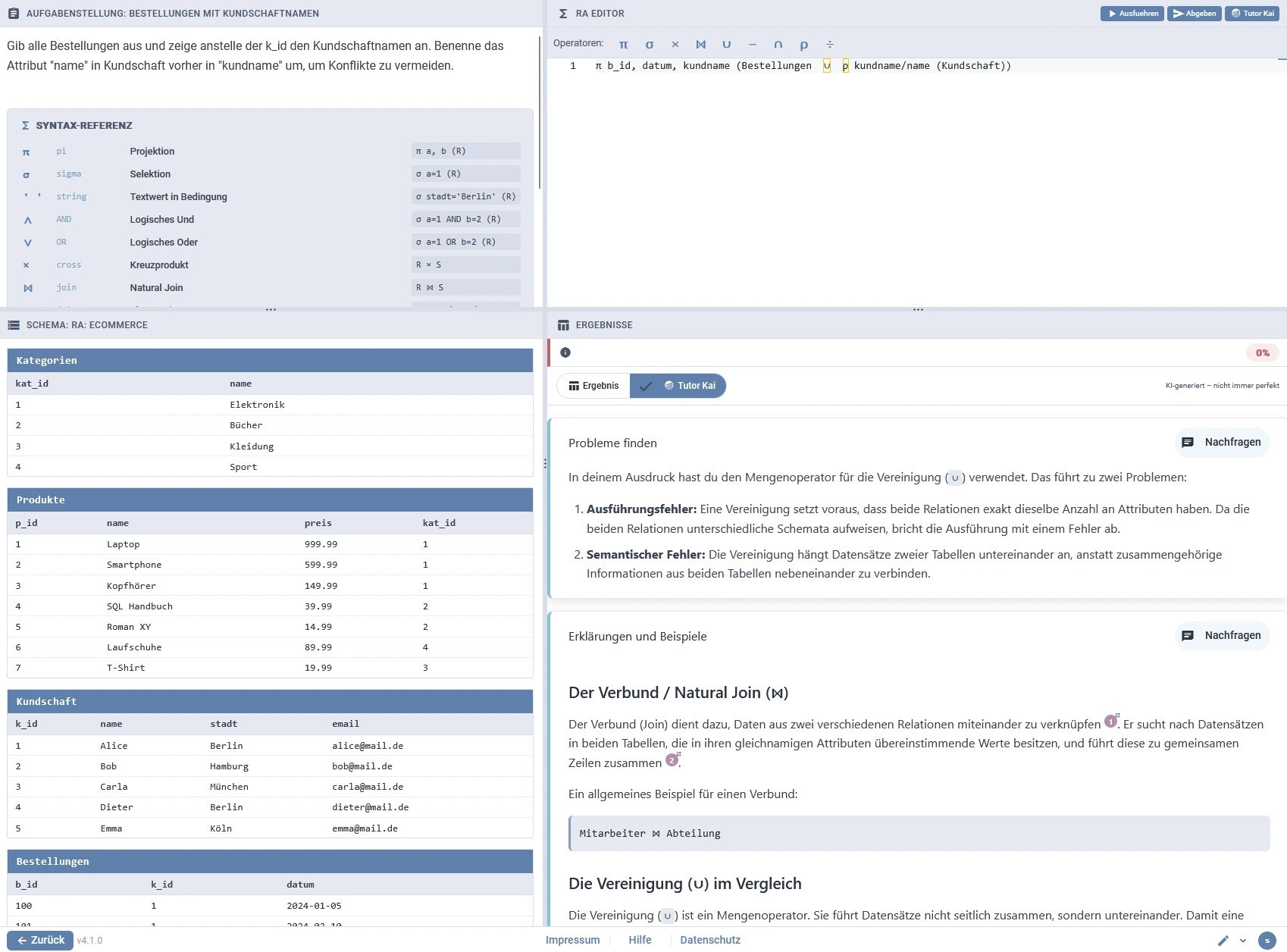
Since relational algebra symbols are not found on a keyboard, an operator toolbar inserts them directly at the cursor position. Alternatively, students can type ASCII keywords (pi, sigma, join, ...), which the grammar accepts as equivalents. A built-in syntax reference lists every operator with its symbol, keyword, and a usage example. Instead of CREATE TABLE statements, the schema view renders each relation in textbook style: relation name, attributes, and sample tuples.
Execution via SQL Translation
Submitted expressions are parsed into an abstract syntax tree using a PEG grammar, translated to SQL, and executed in the same isolated container environment as the SQL tasks. This translation stays completely invisible to students: parser and execution errors are mapped back to user-friendly messages framed purely in relational algebra terms (e.g., a missing attribute list after π), and the editor jumps to the reported error location.
Automated Assessment
Educators provide a reference solution, also written in relational algebra. Both expressions are executed and their result sets compared with set semantics. On a mismatch, students receive a targeted hint depending on whether the projected attributes, the number of tuples, or the tuple contents differ. Analogous to the SQL concept verification, educators can additionally require specific operators: an expression that produces the correct result without them is not accepted, and the missing operators are pointed out (e.g., joining manually via cross product and selection instead of the required natural join).
Tutor-Kai Feedback
Relational algebra tasks are fully integrated with Tutor-Kai: students receive the same four feedback components and can ask follow-up questions on each of them like for all task types.
What Comes Next
We are currently working on extending ADLER with additional task types for the Database Systems lecture:
- Database Modeling Tasks
- B and B* Tree Tasks